
Practice 1 - JavaScript Fundamentals
Introduction
In this first JavaScript practice, we’ll explore the fundamental building blocks of JavaScript programming. Since you already have experience with C programming, many concepts will be familiar - variables, loops, functions, and arrays. However, JavaScript introduces some unique characteristics that make it different from C, particularly its dynamic typing, flexible function syntax, and powerful array methods.
We’ll work with a simple HTML page and a JavaScript file where we’ll learn:
- Variables and data types:
let,const, andvar - Arrays and loops: traditional
forloops and modernfor...ofsyntax - Functions: multiple ways to declare and use functions
- Array methods:
map()andfilter()for functional programming - Type comparison: understanding
==vs===
Prerequisites: Live Server Extension
Before we start coding, you’ll need to install the Live Server extension for VS Code. This tool automatically refreshes your browser whenever you save changes to your HTML or JavaScript files, making development much faster and more convenient.
Installing Live Server
- Open VS Code
- Click on the Extensions icon in the sidebar (or press
Ctrl+Shift+X/Cmd+Shift+X) - Search for “Live Server” by Ritwick Dey
- Click Install
Or install directly from the marketplace: Live Server Extension
Using Live Server
Once installed, you can start a local development server:
- Open your HTML file in VS Code
- Right-click on the HTML file
- Select “Open with Live Server”
- Your default browser will open with your page
- Any changes you make will automatically reload the page!
You can also click the “Go Live” button in the bottom-right corner of VS Code to start the server quickly.
Project Setup
Our practice consists of two simple files:
p1/
├── index.html    # HTML structure with script tag
└── main.js       # JavaScript code
HTML Structure
<!DOCTYPE html>
<html lang="en">
<head>
    <meta charset="UTF-8">
    <meta name="viewport" content="width=device-width, initial-scale=1.0">
    <title>Document</title>
    <script src="./main.js"></script>
</head>
<body>
    <h1 id="heading" class="content">Hello world</h1>
</body>
</html>Notice the <script src="./main.js"></script> tag in the <head>. This loads our JavaScript file. Later, we’ll learn why placing it in the <head> vs the <body> matters, and how to use type="module" for better code organization.
Opening the Developer Console
To see the output of your JavaScript code:
- Open your HTML file in a browser
- Press F12 (Windows/Linux) or Cmd+Option+I (Mac)
- Navigate to the Console tab
- You’ll see all
console.log()output here
1. Variables and Data Types
Unlike C where you must declare variable types explicitly (int x, char* name), JavaScript is dynamically typed - variables can hold any type of value, and their type can change.
Variable Declaration
JavaScript provides three keywords for declaring variables:
let name = "Bob";        // Mutable variable
const age = 23;            // Immutable constant
var oldStyle = "avoid";    // Old-style (avoid using)
let - Mutable Variables
let name = "Bob";
console.log(name);  // Output: Bob

name = "Someone";   // ✓ Can reassign
console.log(name);  // Output: Someone

let name2;          // Without initialization
console.log(name2); // Output: undefined
Key points:
- Can be reassigned
- Block-scoped (only exists within
{ }) - Can be declared without initial value (becomes
undefined)
const - Constants
const age = 23;
console.log(age);   // Output: 23

age = 24;           // ✗ ERROR: Assignment to constant variable
Key points:
- Cannot be reassigned
- Must be initialized when declared
- Block-scoped
- Use
constby default; only useletwhen you need to reassign
var - Legacy (Avoid)
{
    var a = 1;
    let b = 1;
}

a = 2;  // ✓ Works (var is function-scoped)
b = 1; // ✗ ERROR: b is not defined (let is block-scoped)Avoid var in modern JavaScript! It has function-scope instead of block-scope, which can lead to confusing bugs. Always use let or const.
Comparison with C
| C | JavaScript |
|---|---|
int age = 23; | let age = 23; or const age = 23; |
| Type declared explicitly | Type is inferred |
| Cannot change type | Can change type freely |
int x; // garbage value | let x; // undefined |
Primitive Data Types
JavaScript has several built-in primitive types:
let age = 23;              // number
let price = 3.14;          // number (no separate float!)
let name = "Alice";        // string
let isStudent = true;      // boolean
let nothing = null;        // null
let notDefined;            // undefined
Important: Unlike C which has int, float, double, char, JavaScript only has:
number- for all numeric values (integers and decimals)string- for text (nochartype)boolean-trueorfalse
Example:
let temperature = 3.14;    // Still a "number" type
console.log(typeof temperature);  // Output: "number"
2. Arrays and Loops
JavaScript arrays are similar to C arrays but much more flexible and powerful.
Array Basics
let numbers = [2, 3, 4];

console.log(numbers[0]);     // Output: 2
console.log(numbers.length); // Output: 3
Differences from C:
- No need to declare size upfront
- Can grow/shrink dynamically
- Elements can be different types:
[1, "hello", true](though usually avoided)
Array properties:
let items = [10, 20, 30];
console.log(items.length);  // Output: 3
Use .length to get the number of elements (not .size or length()).
Traditional For Loop
let numbers = [2, 3, 4];
let sum = 0;

for (let i = 0; i < numbers.length; i++) {
    sum = sum + numbers[i];
}

console.log("The sum is: " + sum);  // Output: 9
This should be familiar if you know C! The syntax is nearly identical.
Task 1: Summing Even Numbers
Problem: Sum only the even numbers in an array.
Solution:
let numbers = [2, 3, 4];
let sumEven = 0;

for (let i = 0; i < numbers.length; i++) {
    if (numbers[i] % 2 === 0) {
        sumEven = sumEven + numbers[i];
    }
}

console.log("Sum of even numbers: " + sumEven);  // Output: 6
Key concept: A number is even if number % 2 === 0 (remainder is zero when divided by 2).
Modern Alternative: for...of Loop
JavaScript provides a cleaner syntax for iterating over array elements:
let numbers = [2, 3, 4];
let sum = 0;

for (const item of numbers) {
    if (item % 2 === 0) {
        sum = sum + item;
    }
}

console.log("Sum with for...of: " + sum);  // Output: 6
Benefits:
- No need for index variable
i - Cleaner, more readable
- Less error-prone (no off-by-one errors)
- Can use
constsinceitemis reassigned each iteration
When to use for...of?
Use for...of when you need to iterate over array values. If you need the index, use traditional for loop:
// Need values only → use for...of
for (const fruit of fruits) {
    console.log(fruit);
}

// Need index → use traditional for
for (let i = 0; i < fruits.length; i++) {
    console.log(i, fruits[i]);
}
3. Type Coercion and Equality
JavaScript has dynamic typing, which means variables don’t have fixed types. This leads to interesting (and sometimes confusing) behavior with equality checks.
Type Coercion
let x = "1";   // String
let y = 1;     // Number

console.log(x == y);   // Output: true  (type coercion!)
console.log(x === y);  // Output: false (strict equality)
== vs ===
| Operator | Name | Behavior | Example |
|---|---|---|---|
== | Loose equality | Converts types before comparing | "1" == 1 → true |
=== | Strict equality | Compares value AND type | "1" === 1 → false |
console.log(true == 1);    // true  (1 is truthy)
console.log(true === 1);   // false (different types)

console.log("1" == 1);     // true  (string "1" converts to number)
console.log("1" === 1); // false (string vs number)Best practice: Always use === (strict equality) unless you specifically need type coercion. This prevents subtle bugs.
More Type Coercion Examples
Type coercion can be tricky! Here are some common patterns:
Arithmetic with strings:
console.log(4 * "0" + 2);      // 2 (multiply converts "0" to 0)
console.log(4 * 0 + "2");      // "02" (+ with string concatenates)
console.log("5" + 3 - 2);      // 51 ("5"+3="53", then 53-2=51)
console.log(4 - "1" + "6");    // "36" (4-1=3, then "3"+"6"="36")
Equality comparisons:
console.log(42 == "42");       // true (converts types)
console.log(39 === "39");      // false (different types)
console.log(78 !== "78");      // true (different types)
console.log(61 != "61");       // false (converts, both 61)
String concatenation:
The + operator is used for both addition and string concatenation:
let result1 = "Hello" + " " + "World";  // "Hello World"
let result2 = "Score: " + 42;            // "Score: 42"
let result3 = 5 + 10;                    // 15 (both numbers)
let result4 = "5" + 10;                  // "510" (string concat)
4. Functions
JavaScript offers multiple ways to define functions. Coming from C, the first syntax will look familiar, but JavaScript has more modern and flexible options.
Function Declaration (Traditional)
function myFunction() {
    console.log("I am myFunction");
}

myFunction();  // Call the function
This is similar to C functions! However, notice:
- No return type declaration (
void,int, etc.) - No parameter type declarations
Function with Parameters and Return
function isEven(number) {
    return number % 2 === 0;
}

console.log(isEven(4));  // Output: true
console.log(isEven(7));  // Output: false
Function Expression
Functions are first-class citizens in JavaScript - they can be assigned to variables:
const myFunction2 = function() {
    console.log("I'm myFunction2");
};

myFunction2();  // Call it like a normal function
Arrow Functions (Modern Syntax)
Arrow functions provide a shorter syntax, especially useful for simple functions:
// Full syntax with block
const sumNumbers = (a, b) => {
    return a + b;
};

// Concise syntax (implicit return)
const sumNumbers2 = (a, b) => a + b;

console.log(sumNumbers2(5, 3));  // Output: 8
Arrow function rules:
- Single expression: return is implicit
- Multiple statements: use
{ }and explicitreturn - Single parameter: parentheses optional:
x => x * 2 - No parameters: use empty parentheses:
() => console.log("Hi")
Function Declaration Variations Compared
// 1. Traditional function declaration
function sum1(a, b) {
    return a + b;
}

// 2. Function expression
const sum2 = function(a, b) {
    return a + b;
};

// 3. Arrow function (full)
const sum3 = (a, b) => {
    return a + b;
};

// 4. Arrow function (concise)
const sum4 = (a, b) => a + b;

// All do the same thing!
Comparison with C:
| C | JavaScript |
|---|---|
int sum(int a, int b) { return a + b; } | function sum(a, b) { return a + b; } |
| Must declare types | No type declarations |
| One syntax | Multiple syntaxes available |
Template Literals for String Interpolation
JavaScript provides template literals for embedding variables in strings:
let i = 5;
let name = "Alice";

// Old way (string concatenation)
console.log("The value of i is: " + i);  // Works but verbose

// Modern way (template literals)
console.log(`The value of i is: ${i}`);  // Much cleaner!
console.log(`Hello, ${name}!`);          // Output: Hello, Alice!

// Multi-line strings
let message = `This is line 1
This is line 2
The value is ${i}`;
Key points:
- Use backticks (
`) not quotes ("or') - Embed variables with
${variableName} - Only works with backticks!
"${i}"will print literally as"${i}"
5. Functional Array Methods
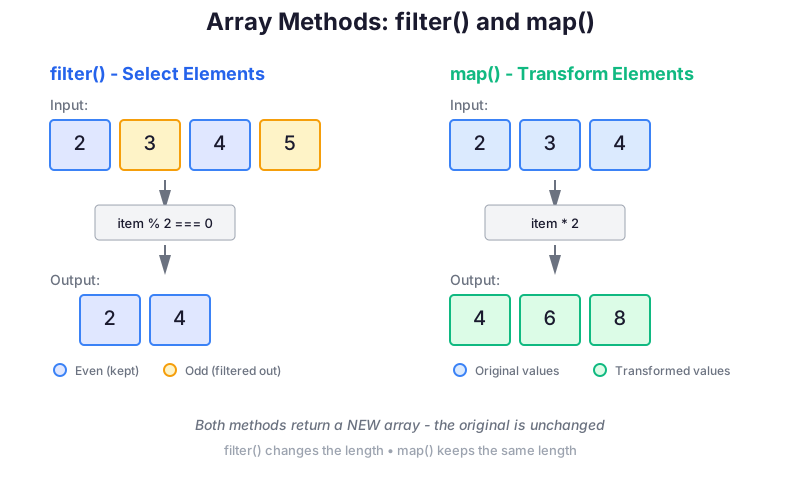
JavaScript arrays have powerful built-in methods for transforming and filtering data. These methods follow functional programming principles.
map() - Transform Each Element
The map() method creates a new array by applying a function to each element.
let numbers = [2, 3, 4];

// Multiply each element by 2
let doubled = numbers.map((item) => item * 2);

console.log(doubled);  // Output: [4, 6, 8]
console.log(numbers);  // Output: [2, 3, 4] (original unchanged!)
Syntax variations:
// Arrow function (concise)
let result1 = numbers.map((item) => item * 2);

// Arrow function (with block)
let result2 = numbers.map((item) => {
    return item * 2;
});

// Traditional function
let result3 = numbers.map(function(item) {
    return item * 2;
});
filter() - Select Elements
The filter() method creates a new array containing only elements that pass a test.
let numbers = [2, 3, 4];

// Keep only even numbers
let evens = numbers.filter((item) => item % 2 === 0);

console.log(evens);  // Output: [2, 4]
Using with helper functions:
function isEven(number) {
    return number % 2 === 0;
}

let evens = numbers.filter((item) => isEven(item));
// Even shorter:
let evens2 = numbers.filter(isEven);
Chaining Methods
You can chain filter() and map() together for powerful transformations:
let numbers = [2, 3, 4];

// Filter evens, then raise each to the power of 3
let evens = numbers.filter((item) => item % 2 === 0);
let cubed = evens.map((item) => item ** 3);

console.log(cubed);  // Output: [8, 64]

// Or chain them:
let result = numbers
    .filter((item) => item % 2 === 0)
    .map((item) => item ** 3);

console.log(result);  // Output: [8, 64]
Note: The ** operator is for exponentiation:
2 ** 3meansitem ** 3means
Comparison: Imperative vs Functional
Imperative approach (traditional loops):
let numbers = [2, 3, 4];
let result = [];

for (let i = 0; i < numbers.length; i++) {
    if (numbers[i] % 2 === 0) {
        result.push(numbers[i] ** 3);
    }
}
Functional approach (array methods):
let numbers = [2, 3, 4];
let result = numbers
    .filter(item => item % 2 === 0)
    .map(item => item ** 3);
The functional approach is:
- ✓ More concise and readable
- ✓ Declarative (describes what not how)
- ✓ Less error-prone
- ✓ Easier to test and debug
Spread Operator (...)
The spread operator (...) allows you to expand arrays:
const myArray = [10, 12, 42];
const newArray = [9, ...myArray, 11];

console.log(newArray);  // Output: [9, 10, 12, 42, 11]
This “spreads out” the elements of myArray into the new array. Useful for:
Combining arrays:
const arr1 = [1, 2];
const arr2 = [3, 4];
const combined = [...arr1, ...arr2];  // [1, 2, 3, 4]
Copying arrays:
const original = [1, 2, 3];
const copy = [...original];  // Creates a new array
Converting NodeList to Array:
// When working with DOM (later):
const nodeList = document.querySelectorAll('.item');
const array1 = Array.from(nodeList);  // Method 1
const array2 = [...nodeList];         // Method 2 (with spread)
6. Comments
JavaScript supports two comment styles (same as C):
// Single-line comment

/*
Multi-line
comment
*/
Summary
Today we covered the essential JavaScript fundamentals:
Variables
let- for mutable variables (block-scoped)const- for constants that won’t change (block-scoped)var- legacy, avoid using
Data Types
- Dynamic typing (no type declarations needed)
- Types can change at runtime
undefinedfor uninitialized variables
Operators & Equality
===- strict equality (checks type and value)==- loose equality (performs type coercion) - avoid%- modulo/remainder**- exponentiation
Arrays & Loops
- Dynamic arrays:
[2, 3, 4] - Traditional
forloop:for (let i = 0; i < arr.length; i++) - Modern
for...of:for (const item of arr)
Functions
- Function declaration:
function name() { } - Function expression:
const name = function() { } - Arrow function:
const name = () => { } - Concise arrow:
const name = (x) => x * 2
Array Methods
map()- transform each element → new arrayfilter()- select elements that pass a test → new array- Methods can be chained for powerful transformations
Practice Exercises
Try these exercises to reinforce what you’ve learned:
Exercise 1: Sum of Squares
Write code that calculates the sum of squares of all odd numbers in an array.
let numbers = [1, 2, 3, 4, 5];
// Expected result: 1² + 3² + 5² = 1 + 9 + 25 = 35
Hints:
- Use
filter()to get odd numbers (item % 2 !== 0) - Use
map()to square them (item ** 2) - Sum them with a
for...ofloop or use.reduce()
Exercise 2: String to Uppercase
Given an array of strings, create a new array where each string is converted to uppercase.
let words = ["hello", "world", "javascript"];
// Expected: ["HELLO", "WORLD", "JAVASCRIPT"]
Hints:
- Use
map()to transform each string - Use the
.toUpperCase()method:"hello".toUpperCase()→"HELLO"
Exercise 3: Multiple of Three
Filter an array to only include numbers that are multiples of 3.
let numbers = [1, 3, 5, 6, 9, 12, 15, 18, 20];
// Expected: [3, 6, 9, 12, 15, 18]
Hint: A number is a multiple of 3 if number % 3 === 0
Next Steps
In the next practice, we’ll learn about:
- DOM manipulation - selecting and modifying HTML elements
- Event handling - responding to user interactions
- Modern JavaScript features - destructuring, spread operator, template literals
Keep practicing with arrays and functions - they’re the foundation of JavaScript programming!