JavaScript Fundamentals
ContentsHideShow
- Introduction
- Prerequisites: the Live Server extension
- Project setup
- 1. Printing and comments
- 2. Variables and data types
- 3. Template literals
- 4. Types and typeof
- 5. Converting between types
- 6. Type coercion
- 7. Equality: === vs ==
- 8. Arrays and loops
- 9. Functions
- 10. map()
- 11. Beyond the class: filter, chaining, spread, objects
- Before moving on: what should look familiar
- Summary
- Tasks
- Next steps
Introduction
This is the first JavaScript practice. You already know C, so a lot of what follows will look familiar: variables, if, loops, functions, arrays. The interesting parts are the places where JavaScript deliberately behaves differently, and there are more of those than you would expect.
Everything today happens in the browser Console. We do not touch the page itself yet, we only print values. Changing the page is Practice 2.
What we cover:
- Running JavaScript from an HTML page, and reading the Console
- Variables:
let,const,var, and block scope - Dynamic typing,
typeof, and converting between types - Type coercion,
==vs=== - Arrays,
forandfor...of, conditions - The four ways to write a function
map(), and why it replaces a loop you already know how to write
Prerequisites: the Live Server extension
You need the Live Server extension for VS Code. It serves your folder over http:// and reloads the browser every time you save.
- Open VS Code
- Open the Extensions panel (
Ctrl+Shift+X/Cmd+Shift+X) - Search for “Live Server” by Ritwick Dey
- Click Install
Direct link: Live Server Extension
To use it: right-click index.html in the file explorer and pick “Open with Live Server”, or click “Go Live” in the bottom-right status bar.
Opening the Console
- Open the page in the browser
- Press F12 (Windows/Linux) or Cmd+Option+I (Mac)
- Switch to the Console tab
Everything console.log() prints shows up there, together with any error messages. Keep VS Code and the browser side by side if your screen allows it.
Project setup
The folder we used in class had three files:
practice-01/
├── index.html    # the page, with a <script> tag
├── script.js     # our JavaScript code
└── style.css # a stylesheet (barely used today)<!DOCTYPE html>
<html lang="en">
<head>
<meta charset="UTF-8">
<meta name="viewport" content="width=device-width, initial-scale=1.0">
<title>Document</title>
<link rel="stylesheet" href="style.css">
<script src="script.js"></script>
</head>
<body>
<h1>Hello, Krisztián</h1>
<h2>MF5M7S</h2>
</body>
</html>/* style.css */
h1 {
color: red;
}1. Printing and comments
console.log("Hello world");
console.log('Hello world with single quotes');
Double quotes and single quotes are identical in JavaScript. Pick one and stay consistent (this course uses double quotes). There is a third kind of quote, the backtick, and it does something extra - see template literals below.
Comments are the same two forms as in C:
// single-line comment

/*
Multiple
lines
of comments
*/
2. Variables and data types
In C you declare a type: int x. JavaScript never asks you for one. A variable is just a name, and it can hold anything.
let name = "Krisztián";     // can be reassigned
const neptun = "MF5M7S";    // cannot be reassigned
var oldStyle = "avoid me";  // legacy, do not use
let - reassignable
let name = "Krisztián";
console.log(name);   // Krisztián

name = "Someone";    // fine
console.log(name);   // Someone
You may declare a variable without giving it a value:
let age;
console.log(age);    // undefined
In C an uninitialised local variable contains garbage. In JavaScript it contains undefined, which is a real value meaning “nothing has been put here yet”.
const - not reassignable
const university = "ELTE";
console.log(university);   // ELTE

university = "BME";        // TypeError: Assignment to constant variable.
Rules:
- must be given a value at declaration
- cannot be reassigned afterwards
- block-scoped, like
let
Use const by default. Switch to let only when you actually intend to reassign the variable. It is not about safety theatre: a const tells the next reader “this name means the same thing everywhere below”, which is genuinely useful information.
var - legacy, and why we skip it
{
  let y = 1;
  var z = 2;
}

console.log(z);   // 2   - var escaped the block
console.log(y);   // ReferenceError: y is not defined
var is function-scoped: it ignores { } blocks entirely and leaks out of them. let and const are block-scoped: they only exist between the braces they were declared in, exactly like C.
You will meet var in older code and in older tutorials online. Do not write new code with it.
Comparison with C
| C | JavaScript |
|---|---|
int age = 23; | let age = 23; or const age = 23; |
| type declared explicitly | no type in the declaration |
| type cannot change | type can change at any time |
int x; holds garbage | let x; holds undefined |
{ } limits scope | { } limits let / const, but not var |
3. Template literals
Gluing strings together with + works, but it gets unreadable fast:
const name = "Krisztián";

console.log("Hello, " + name);      // Hello, Krisztián
The modern way uses backticks and ${ }:
console.log(`Hello, ${name}`);      // Hello, Krisztián
console.log(`Hello, ${name} ...`);  // Hello, Krisztián ...
If you know C#, ${ } is the same idea as $"hello {name}". In C the closest thing is printf("Hello, %s\n", name), except here the expression sits inside the string itself.
Anything can go inside ${ }, not just a variable name:
const a = 1;

console.log(`a is ${a}.`);
console.log(`a doubled is ${a * 2}.`);
Backticks also allow real multi-line strings:
const message = `This is line 1
This is line 2
The value is ${a}`;4. Types and typeof
The typeof operator tells you what kind of value you are holding:
console.log(typeof "ELTE");   // "string"
console.log(typeof 23);       // "number"
console.log(typeof 3.14);     // "number"
console.log(typeof true);     // "boolean"

let age;
console.log(typeof age);      // "undefined"
The primitive types you need today are string, number, boolean and undefined.
Note what is missing compared to C: there is no int / float / double split, and no char. 23 and 3.14 are both number. A single character is just a string of length 1.
These are called primitive values: they are single values, not containers. Arrays, objects and functions are not primitive types. They can contain values or behaviour, and typeof reports an array or an ordinary object as "object":
console.log(typeof "A");        // "string" - still no separate char type
console.log(typeof 3.14);       // "number"
console.log(typeof [1, 2, 3]);  // "object"
console.log(typeof { x: 1 });   // "object"
console.log(typeof function () {}); // "function"
typeof [] does not say "array". When that distinction matters, use Array.isArray(value).
5. Converting between types
A very common situation: you have a string that contains digits and you need an actual number. (Later in the semester, everything you read out of an input field arrives as a string, so this comes back.)
const aNumber = "10";
console.log(typeof aNumber);              // "string"
Three ways to convert it:
// 1. Number() - the explicit, readable one
console.log(typeof Number(aNumber));      // "number"

// 2. parseInt() - reads an integer from the front of the string
console.log(parseInt(aNumber));           // 10

// 3. unary + - short, and you will see it in other people's code
const asNumber = +aNumber;
console.log(typeof asNumber);             // "number"
Prefer Number(). It is the one that reads as what it does.
The difference between Number() and parseInt() shows up on messy input:
console.log(Number("10px"));      // NaN     - refuses the whole string
console.log(parseInt("10px"));    // 10      - takes the leading digits
console.log(parseInt("3.9"));     // 3       - integer only, cuts the rest
NaN
When a conversion or a calculation fails, you get NaN:
console.log(Number("hello"));     // NaN
console.log(typeof NaN);          // "number"   (!)
NaN stands for “Not a Number”, and its type is number. That is not a typo: it is the value produced by a failed numeric operation, so it lives in the number world.
It has one more oddity worth parking in your head:
console.log(NaN === NaN); // falseEvery other value in the language equals itself. NaN does not, because it means “a calculation that failed”, and two failures are not the same failure.
6. Type coercion
Because variables have no fixed type, JavaScript converts values automatically when an operator needs it. This is called coercion, and it is where the language’s reputation comes from.
console.log("2" + 3);        // "23"    - + with a string glues
console.log("5" - 3);        // 2       - - has no string meaning, so it converts
console.log(4 * "0" + 2);    // 2
console.log(4 - "1" + "6");  // "36"    - 4-1=3, then "3"+"6"
The rule underneath is small: + means “add” for numbers and “join” for strings, so as soon as one side is a string you get joining. Every other arithmetic operator (-, *, /, %, **) has no string meaning, so it converts both sides to numbers first.
Two examples from the projector, worth walking through slowly:
console.log("2" + 3 * 6);* binds tighter than +, exactly like in C, so 3 * 6 runs first and gives 18. Then "2" + 18 joins, giving "218".
console.log("2" * 3 + 2 * "abc");"2" * 3 converts and gives 6. 2 * "abc" cannot convert, so it gives NaN. Then 6 + NaN is NaN, because anything arithmetic touching NaN stays NaN.
7. Equality: === vs ==
console.log("1" == 1);    // true    - loose: converts, then compares
console.log("1" === 1); // false - strict: compares value AND type| Operator | Name | Behaviour | Example |
|---|---|---|---|
== | loose equality | converts types, then compares | "1" == 1 is true |
=== | strict equality | compares value and type | "1" === 1 is false |
!= | loose inequality | converts types | 61 != "61" is false |
!== | strict inequality | compares value and type | 78 !== "78" is true |
More examples:
console.log(17 == "17");    // true
console.log(85 === "85");   // false
console.log(false == 0);    // true
console.log(false === 0);   // false
Used in a condition:
if ("1" === 1) {
  console.log("They are the same");
}
else {
  console.log("They are different.");
}Truthy and falsy
A condition does not need a boolean. Any value works, and JavaScript decides whether it counts as true:
if ("") console.log("empty string is truthy");        // does not print
if (0) console.log("zero is truthy");                 // does not print
if ("hello") console.log("non-empty string is truthy"); // prints
Falsy values, the complete list: false, 0, "", null, undefined, NaN. Everything else is truthy, including "0", [] and {}.
This becomes genuinely useful when we validate forms. For now, just know it exists, because it explains a few accidents later in this article.
8. Arrays and loops
let data = [1, 2, 3];

console.log(data[0]);       // 1
console.log(data.at(0));    // 1   - same thing, newer syntax
console.log(data.length);   // 3
Compared to C arrays:
- no size declared up front, and they grow and shrink freely
.lengthis a property, not.sizeand notlength()- elements may be of mixed types (
[1, "hello", true]is legal, though usually a bad idea) data.at(i)does the same asdata[i], but also accepts negative indexes:data.at(-1)is the last element
An empty array to start from is just let data = [];.
Classic for loop
Identical to C:
let data = [1, 2, 3];

for (let i = 0; i < data.length; i++) {
  console.log("element: " + data[i]);
  console.log(`The ${i}-th element is: ${data[i]}`);
}
for...of
The version you should reach for by default:
let total = 0;

for (const item of data) {
  console.log(item);
  total = total + item;
}

console.log("Total is " + total);   // Total is 6
What disappeared is the index. Most of the time you do not want the position, you want the value, and i only exists as a source of off-by-one bugs. Use for...of unless you specifically need the index.
Arithmetic operators
+, -, *, /, plus two that matter today:
console.log(7 % 2);    // 1   - remainder
console.log(6 % 2);    // 0
console.log(2 ** 3);   // 8   - 2 to the power of 3
So n % 2 === 0 means “n is even”. You will type that a lot.
+= and friends work as in C:
total += item; // same as total = total + itemTask: sum the even elements
function sumEven(data) {
  let result = 0;

  for (const item of data) {
    if (item % 2 === 0) {
      result += item;
    }
  }

  return result;
}

console.log(sumEven([2, 3, 4])); // 6Building a new array with push
let data = [1, 2, 3];
let squaredResult = [];

for (const item of data) {
  squaredResult.push(item ** 2);
}

console.log(squaredResult);   // [1, 4, 9]
console.log(data);            // [1, 2, 3]   - untouched
Three moves: create an empty array, loop over the original, push each new value into the new array.
Look at that second console.log. The input array did not change. We built something new instead of damaging what we had, and that habit matters for the whole semester.
9. Functions
A function declaration looks almost like C, minus the types:
function sum(x, y) {
  return x + y;
}

console.log(sum(1, 2));   // 3
No return type, no parameter types, and no forward declarations.
A function with no parameters and no return value:
function print() {
  console.log("Printing");
}

print();
Functions are values
This is the part that has no C equivalent. A function can be stored in a variable, exactly like a number can:
// 1. function declaration
function sum(x, y) {
  return x + y;
}

// 2. function expression
const sum2 = function (x, y) {
  return x + y;
};

// 3. arrow function, with a body
const sum3 = (x, y) => {
  return x + y;
};

// 4. arrow function, concise
const sum4 = (x, y) => x + y;

console.log(sum(1, 2));    // 3
console.log(sum2(1, 2));   // 3
console.log(sum3(1, 2));   // 3
console.log(sum4(1, 2));   // 3
All four do the same thing. The differences that matter today:
- an arrow function with
{ }needs an explicitreturn, like any other body - an arrow function without braces returns its single expression automatically, because there is nothing else it could mean
- with exactly one parameter the parentheses are optional:
x => x * 2 - with no parameters you still need them:
() => console.log("Hi")
The important idea is not the syntax, it is that sum2 is a variable holding a function. And if a function is a value, you can hand it to something else. That is the whole basis of the next section.
10. map()
Look at the loop we wrote a moment ago:
const squaredResult = [];
for (const item of data) {
  squaredResult.push(item ** 2);
}
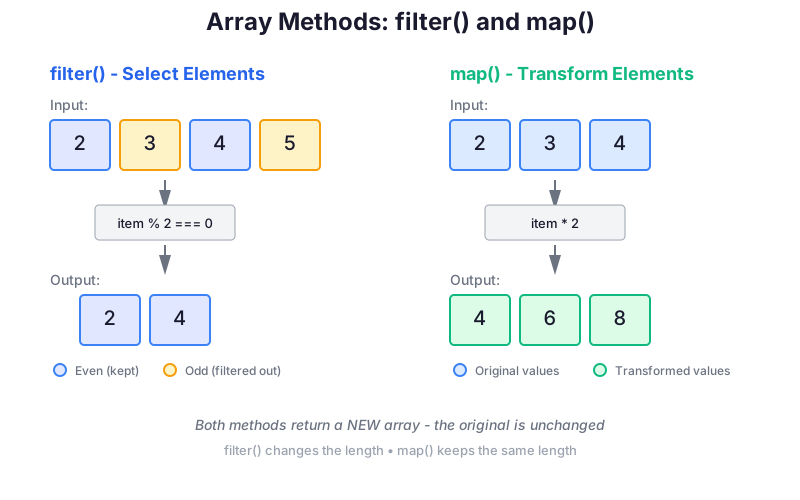
Make a new array, walk the old one, put one new element in for each old one. That pattern is so common that arrays have a method for it:
const data = [1, 2, 3];

const resultMap = data.map((item) => item ** 2);

console.log(resultMap);   // [1, 4, 9]
console.log(data);        // [1, 2, 3]   - still untouched
Five lines against one, same result. [1,2,3] becomes [1,4,9].
The function you pass in
The thing inside the parentheses is a callback: a function that map calls once per element. It can be written any of the ways from the previous section:
data.map(function (item) { return item ** 2; });   // function expression
data.map((item) => { return item ** 2; });         // arrow with a body
data.map((item) => item ** 2);                     // arrow, concise
Array-method callbacks may receive three arguments, always in this order:
const labels = ["keyboard", "monitor", "mouse"].map(
  (item, index, array) => `${index + 1}/${array.length}: ${item}`,
);

console.log(labels);
// ["1/3: keyboard", "2/3: monitor", "3/3: mouse"]item: the current element;index: its zero-based position;array: the original array on which the method was called.
Declare only the parameters you use. Most callbacks need only the element; the other two are available when the calculation depends on position or the whole input.
Or you can pass a function you already have, by name:
const squareThis = (item) => item ** 2;

// or, equivalently:
function squareThis2(item) {
  return item ** 2;
}

const resultMap2 = data.map(squareThis);
const resultMap3 = data.map(squareThis2);The rules of map
- one element in, one element out: the result always has the same length as the input
- it always returns a new array, and never modifies the original
- if your callback returns nothing, you get an array full of
undefined
11. Beyond the class: filter, chaining, spread, objects
We ran out of time before these in class, so read this section before doing tasks g to j. Nothing here is harder than map.
filter() - keep some elements
const numbers = [1, 2, 3, 4, 5, 6];

const evens = numbers.filter((number) => number % 2 === 0);

console.log(evens);   // [2, 4, 6]
The difference from map is entirely in what the callback returns:
mapwants a new value for each element, and gives back an array of the same lengthfilterwants a yes or no for each element, and gives back a shorter array (possibly empty)
Side by side:
numbers.map((n) => n % 2 === 0);      // [false, true, false, true, ...]  - useless
numbers.filter((n) => n % 2 === 0);   // [2, 4, 6]                        - what you wanted
You can pass a named function here too:
function isEven(number) {
  return number % 2 === 0;
}

const evens = numbers.filter(isEven);
Chaining
filter returns an array. Arrays have .map. So you can keep going:
const numbers = [1, 2, 3, 4, 5, 6];

const result = numbers
  .filter((number) => number % 2 === 0)
  .map((number) => number ** 3);

console.log(result);   // [8, 64, 216]
Read it left to right, out loud: take the numbers, keep the even ones, cube them.
Doing it in two steps with an intermediate variable is equally correct, and sometimes clearer:
const evens = numbers.filter((number) => number % 2 === 0);
const cubed = evens.map((number) => number ** 3);
Imperative versus functional, one last time
With a loop:
const result = [];

for (const number of numbers) {
  if (number % 2 === 0) {
    result.push(number ** 3);
  }
}
With array methods:
const result = numbers
  .filter((number) => number % 2 === 0)
  .map((number) => number ** 3);
The second version says what you want rather than how to walk the array, it cannot go off by one, and it leaves the input alone. Both are correct code; the second is the one we build on from here.
Spread syntax (...)
Three dots mean “unpack this array here”:
const myArray = [3, 7, 25];
const newArray = [5, ...myArray, 8];

console.log(newArray);   // [5, 3, 7, 25, 8]
Joining two arrays:
const first = [1, 2];
const second = [3, 4];
const both = [...first, ...second];

console.log(both);     // [1, 2, 3, 4]
console.log(first);    // [1, 2]   - untouched
Copying an array:
const original = [1, 2, 3];
const copy = [...original];   // a genuinely new array, not another name for the same one
It also turns array-like things into real arrays, which is how we will use it on the DOM in a few weeks:
const nodeList = document.querySelectorAll(".item");

const array1 = Array.from(nodeList);
const array2 = [...nodeList];
Objects, the minimum needed for task j
Arrays store values by position. Objects store them by name:
const person = { name: "Alice", age: 23 };

console.log(person.name);   // "Alice"
console.log(person.age);    // 23

person.age = 24;            // change a value
person.city = "Budapest";   // add a new one
Building one up as a counter:
const counters = { even: 0, odd: 0 };

counters.even = counters.even + 1;
counters.odd += 1;

console.log(counters);   // { even: 1, odd: 1 }
That is all task j needs. We come back to objects properly later.
Before moving on: what should look familiar
At this point you should be able to recognise these shapes even before you know what a larger program is trying to do:
constprevents reassignment of the variable, while the contents of an array or object may still change;array.lengthis a property, andfor...ofvisits the values;function f() {},const f = function () {}, and both arrow-function forms all create functions;- a callback with braces needs
returnif its caller expects a result; [first, ...rest, last]unpacks an array into another array;===and!==compare without automatic type conversion;maptransforms,filterselects, and both return new arrays.
When reading a chain, follow it from left to right and keep track of the value after each step. That habit is more reliable than trying to understand the whole line at once.
Summary
Variables
constby default,letwhen you will reassign, nevervarlet x;givesundefined, not garbagelet/constare block-scoped;varleaks out of blocks
Types
- one numeric type:
number(noint/floatsplit), plusstring,boolean,undefined - arrays and objects are non-primitive values;
typeofreports both as"object" typeof valuereports the type; the parentheses intypeof(value)are optional- convert with
Number(),parseInt()or unary+; a failed conversion givesNaN
Operators and equality
%remainder,**power (not^)+joins when either side is a string, everything else converts to numbers- always
===/!==, never==/!= - falsy:
false,0,"",null,undefined,NaN; everything else is truthy
Arrays and loops
[1, 2, 3],.length,data[i]ordata.at(i)for (let i = 0; ...)when you need the index,for (const item of data)otherwise- build new arrays with an empty array plus
push, do not modify the input
Functions
function f(a, b) { },const f = function (a, b) { },const f = (a, b) => { },const f = (a, b) => a + b- functions are values, so they can be passed to other functions
- concise arrows return automatically; arrows with braces need
return
Array methods
map()transforms each element, giving a new array of the same lengthfilter()keeps the elements whose callback returnstrue, giving a shorter array- callbacks may receive
(element, index, array)in that order - both return a new array and leave the original alone; they chain
Tasks
In class / at home: Practice 1 - In-class tasks
Ten small functions, a to j, in exactly the order of this article. We solved several of them together in class; finish the rest at home. There are no automatic tests here: you write the function, call it, and compare what the Console prints against the expected line in the task description.
The spine of the package is e and f. Task e cubes an array with a loop and push; task f does the same job in one line with map. Write both, run both, and see that they agree.
Homework, graded: Arcade Scores - array methods
Bigger, ten functions, real messy data with strings and null mixed into the numbers. It is checked automatically, so read its rules carefully: it insists on plain global functions, with no import and no export.
You can also try short snippets without creating a project at all, on the site’s playground.
Next steps
Next week we stop printing to the Console and start changing the page itself:
- DOM basics: finding elements with
querySelector, reading and writing their content - Events: reacting to clicks and typing
- and the reason the
<script>tag in the<head>is about to become a problem
Keep practising with arrays, functions and map. Practically everything we write for the rest of the semester is built on those three.